Skip to content

Incident Management + Response

The incident management and dispatch tool for your unified command office. Every incident is pinned to the geo-referenced CAD site plan — NIMS/ICS-aligned, camera-integrated, and audit-ready, from load-in through load-out.
MasterGrid Command: a live event site map with geo-referenced incident markers across security, medical, guest services, and operations tracks, a right-click track picker, a layers panel for cameras, exits and gates, and CAD overlay, and a live incident table under a green alert banner.

NIMS/ICS-aligned. Camera-integrated. Built for the report you’ll have to defend.

Drop an incident exactly where it happened

Right-click anywhere on the geo-referenced CAD site plan and pick a track. The incident drops as a pulsing, geo-located marker — no address guesswork, no “somewhere near the second bar.”
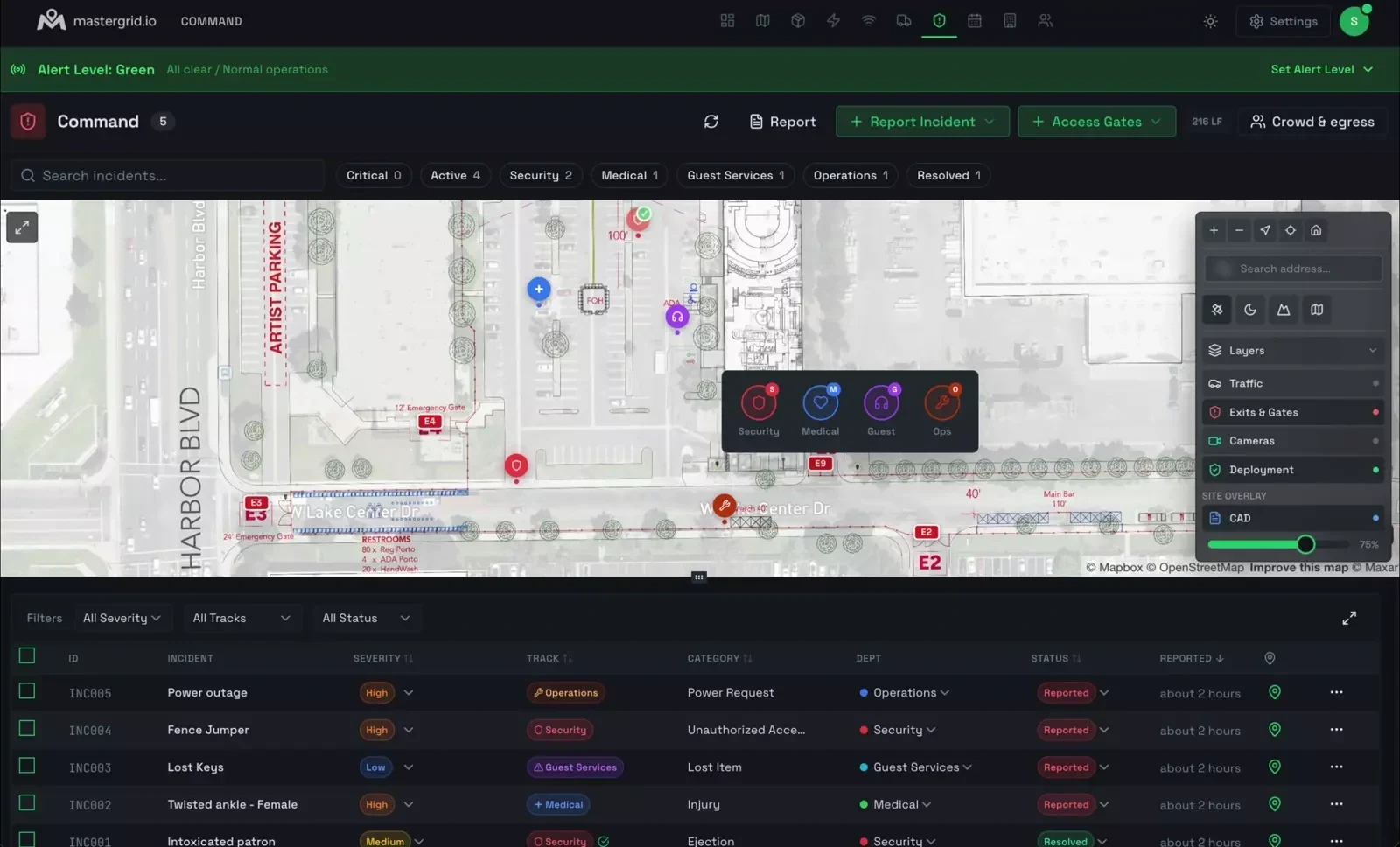
  • Right-click the plan. A track picker opens where you clicked — Security, Medical, Guest Services, Operations.
  • Place it from the field, on a phone. Staff on the ground drop incidents straight from their phones — pinned to the exact spot where it’s happening.
  • Every incident has a location and a What3Words address. Direct security on the radio to the exact three-word spot.
  • Jump to the nearest camera straight from the incident.

Right-click → pick a track

  • Security
  • Medical
  • Guest
  • Ops

Mass messaging

Broadcast an alert or a directive to every responder at once — over the channels they already carry. No phone tree, no “did everyone get it?”

  • SMS / Text
  • WhatsApp
  • Slack
Report Security Incident form: incident name, description and notes, hazards and safety notes, severity (Medium), status (Reported), an operational track selector — Security, Medical, Guest Services, Operations — and a category dropdown, geotagged to the incident location.
Log an incident in seconds — geotagged, with severity, track, and category.

Five-tier alert system

Event-wide. One shared posture, set from Command.

  • Green All clear. Normal operations. Active
  • Yellow Heightened awareness. A developing situation is being watched.
  • Orange Elevated. An active incident is being worked; resources committed.
  • Red Critical. Life-safety emergency; unified command engaged.
  • Black Catastrophic. Site-wide emergency or MCI; evacuation or shelter in effect.

Structured triage

The same shape every responder knows — so nothing falls between tracks.

Severity

Low Medium High Critical

Status workflow

  1. Reported
  2. Acknowledged
  3. On Scene
  4. Referred
  5. Resolved

Operational tracks — Security/Command, Medical, Guest Services, Operations — with 30+ incident categories underneath. MCI levels 1–4, patient counts, and transport tracking when a medical event scales.

NIMS/ICS structure

Operational tracks — Security/Command, Medical, Guest Services, Operations. 30+ incident categories and four severity levels, on a status workflow your team already understands.

Medical & MCI

Mass Casualty Incident support to NIMS/ICS — MCI levels 1–4, patient counts, and transport tracking — so a surge is structured, not chaotic.

Evidence chain

Witness statements and evidence captured per incident. Every open, edit, and note is logged to an activity trail; incidents lock on resolution, so the record can’t be quietly changed.

Automated reports

One-click PDF incident reports, built for insurers, local authorities, and legal proceedings. The report you produce is the one you can stand behind.

Camera integration

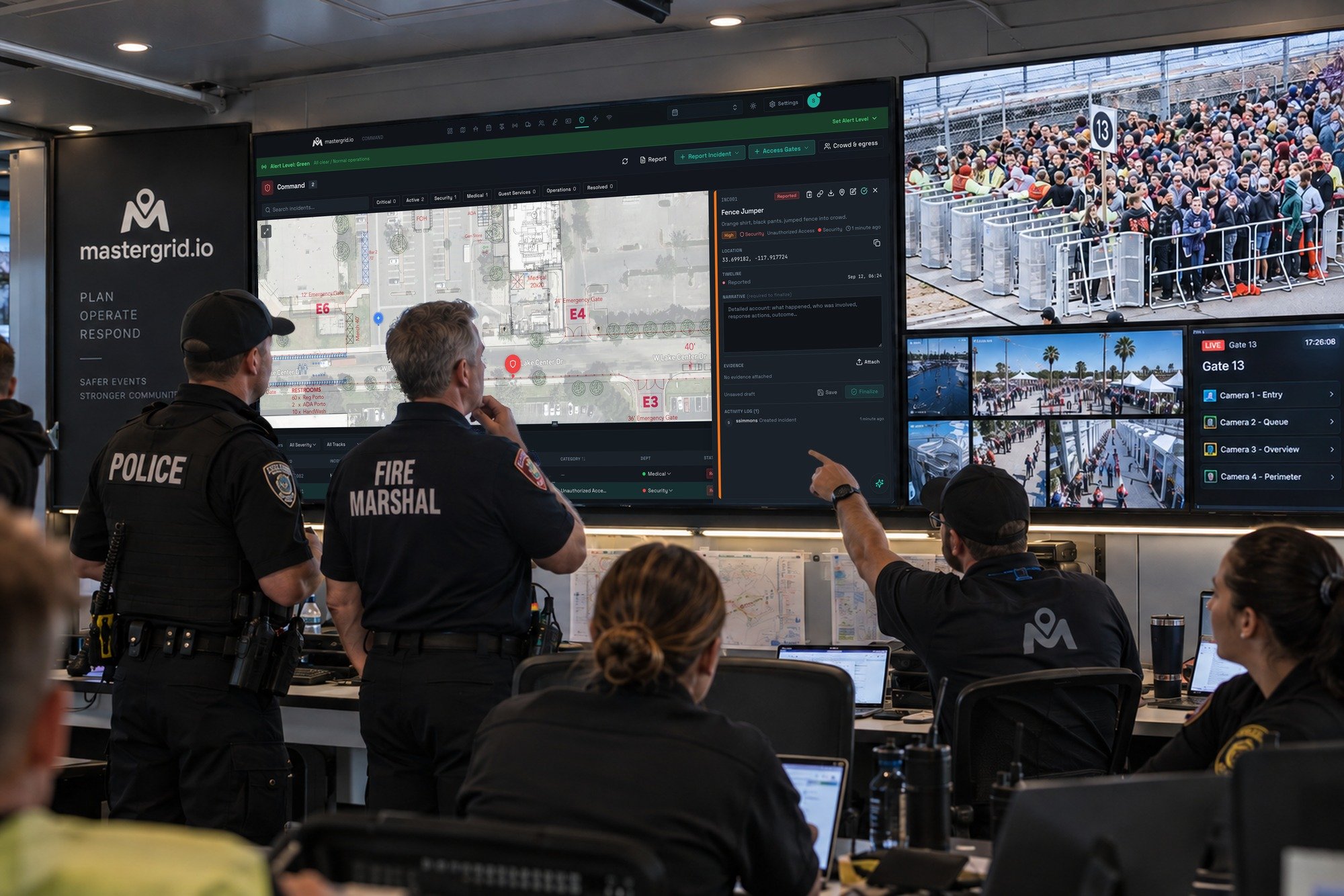
Cameras placed in Networking surface as a live layer on the incident — eyes on the scene without leaving Command.

Map & table views

Live incident markers on the map — active ones pulse — plus a table you can filter by track, severity, and status. The whole operating picture, two ways.

See the shape of a problem while it’s still on the drawing

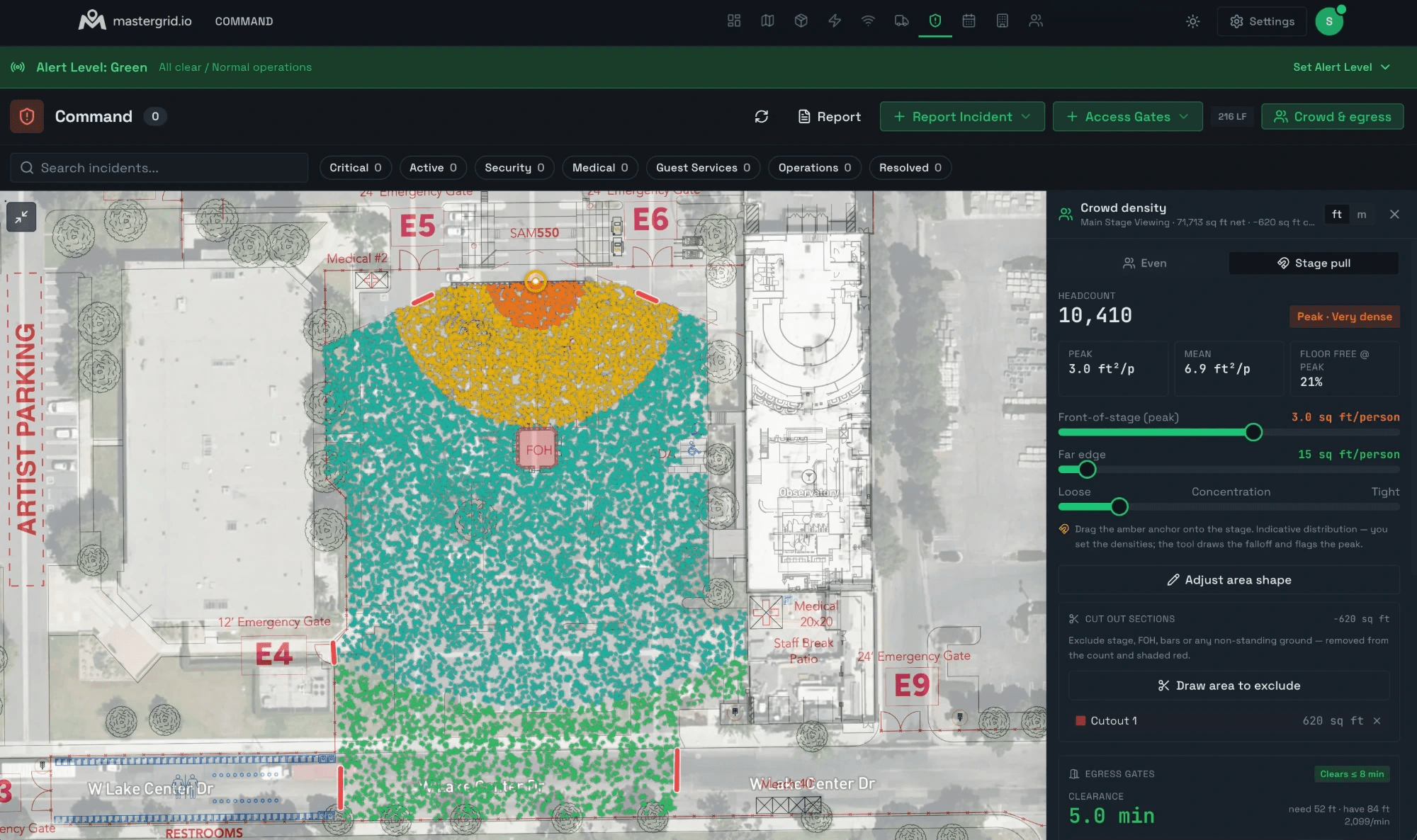
Draw any area on the map. MasterGrid fills it with a to-scale crowd — one dot, one person — at the density you set, grades it against Fruin Level-of-Service, and flags where crush risk begins.

The Crowd Density Calculator in MasterGrid: a to-scale crowd drawn over the main-stage viewing area, shaded green through amber to red with the dense front-of-stage flagged Peak · Very dense — headcount 10,410, peak 3.0 ft²/person, mean 6.9 ft²/person, 21% floor free at peak, and egress gates clearing in 5.0 minutes.
Level of Service Fruin, 1971
A B C D E F
A · Free flow D · Restricted F · Crush

Crowd density is read in people per square metre. Crush risk climbs sharply above ~4–5 people/m². The trigger is density, not panic.

Comfortable LOS B
~1.5 /m²

Free, easy movement

Restricted LOS D
~3 /m²

Movement constrained, shuffling

Crush risk Crush risk
~6 /m² LOS F

Involuntary contact, pressure builds

Same drawn area, three densities. Figures illustrate each state — not exact band cutoffs.

Grounded in the science

Fruin’s Level-of-Service (A–F) — the framework crowd-safety practitioners actually use.

Always free — safety is never paywalled

The Crowd Density Calculator is free on every plan, forever.

A planning aid, not a clearance. The crowd density calculator estimates — it does not assess. It informs planning and discussion; it is not a substitute for a qualified crowd-safety professional, a formal crowd risk assessment, or real-time monitoring on the day. Treat every figure as a reason to look closer — never as a sign-off.

Crowd crush is a design failure, not a panic

The most lethal moments in event history were not stampedes of frightened people. They were density failures — too many bodies in too little space, clustered at ingress and choke points, until movement stopped and pressure did the rest. Density is the trigger. Command is built to see it on the plan and document it in the moment.

It was built by operators who have run site operations for the world’s most demanding productions — festivals, stadiums, and a global motorsport championship — not by engineers guessing at the problem from the outside.

And when it’s over, the record holds up. The report you produce in Command is the one you can hand an insurer, an authority, or a court — timestamped, attributed, and locked.

Questions operators ask

Is Command NIMS/ICS aligned?

Yes — operational tracks, a five-tier alert system, MCI support, an auditable evidence chain, and automated incident reports, out of the box.

Can I export incident reports for insurers and authorities?

Yes. Command produces automated, audit-ready PDF incident reports built for insurers, local authorities, and legal proceedings.

Is the crowd density calculator a substitute for a crowd-safety assessment?

No. It is an estimate and a planning aid. It does not replace a qualified crowd-safety professional, a formal crowd risk assessment, or real-time monitoring on the day.

What does the crowd density calculator cost?

Nothing. It is free on every plan, including Free, forever. Safety is never paywalled.

Do cameras connect to incidents?

Yes. Cameras placed in the Networking module surface as a live layer inside Command, tied to the incident.

Ready to deploy?

We're onboarding a limited cohort of operations teams for the 2026 season. Priority goes to festivals, venues, and major event operators.

We review on a rolling basis. No spam, no list-selling.