Skip to content

The operating system for major events

  • Build Schedules
  • Advance Forms
  • Credentials
  • Unified Command
  • Tactical Mapping
  • Heavy Equipment
  • Power Planning
  • Carbon Reporting

MasterGrid is the operational layer on top of your CAD.
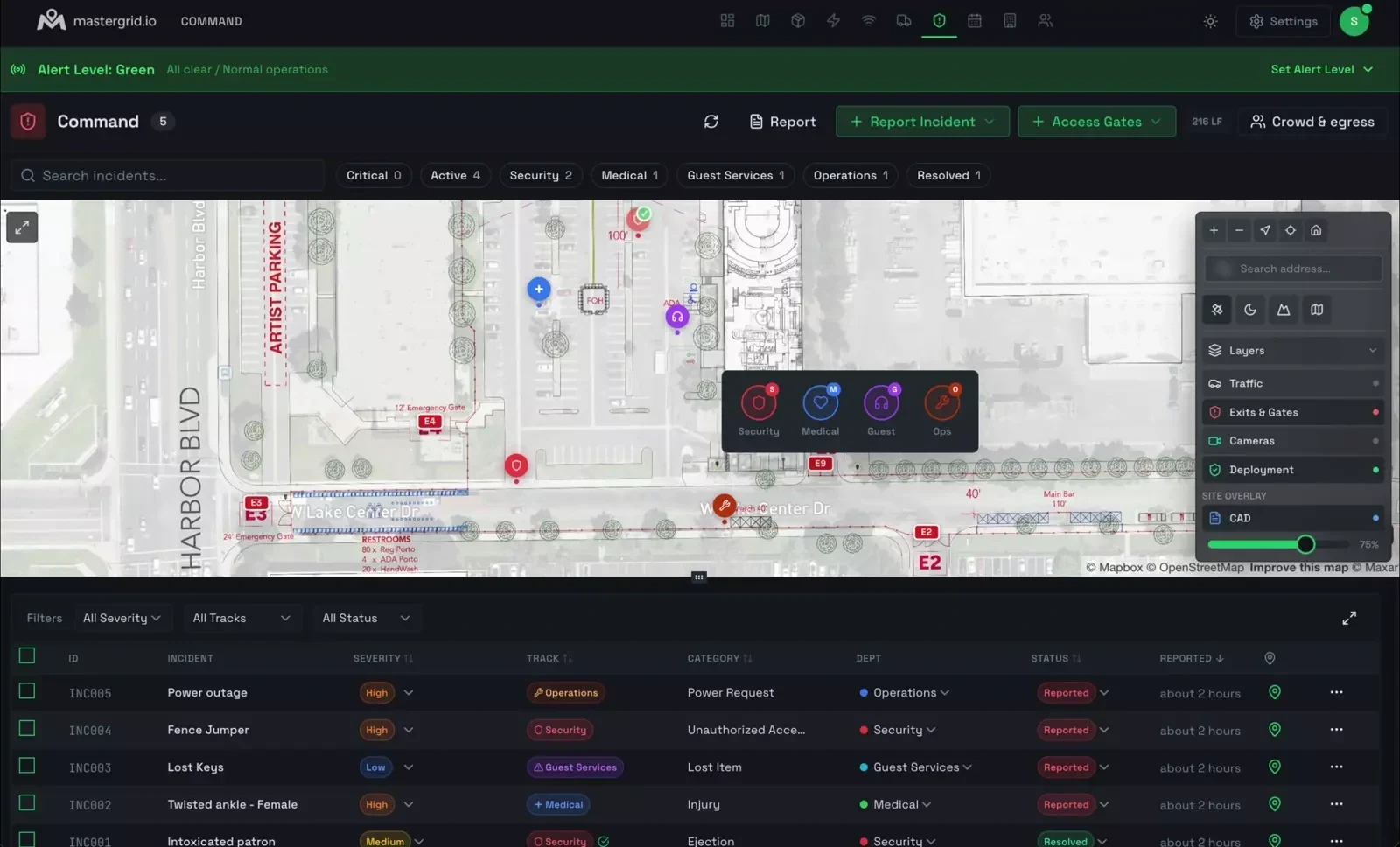
MasterGrid Command running on a laptop: a live event site map with geo-referenced incident markers, a layers panel, and a live incident table under a green alert banner.

The event is the database.

Site, infrastructure, operations, live state and time all sit on the same map in one shared record. Change one layer and every module that reads it sees the change.

  1. Plan Design
  2. Build Deploy
  3. Operate Live Now
  4. Strike Close
  • Basemap
  • Power
  • Networking
  • Quartermaster
  • Spaces
  • Vendors
  • Staff
  • Production
  • Command
  • Deployment
  • Schedule
  • Dashboard
  • One connected model
  • Festivals
  • Stadiums
  • Parks
  • Grand Prix
  • Theme parks

The way major events run today

Today
  • Eight spreadsheets, none of them agreeing
  • Site plans emailed as PDFs, out of date the day they are sent
  • Vendors executing on outdated information
  • Incidents logged in Excel, no evidence chain
  • Carbon reporting reconstructed after the show, if at all
With MasterGrid
  • Spreadsheets imported once, then kept current in the app
  • The current site plan on every phone, not last week's PDF
  • Vendor changes approved before anything on site moves
  • Incidents logged on the map with evidence, locked when resolved
  • Fuel and carbon reported as you go, every figure with its basis stated

Built by a team of operators who have run site operations on major productions for two decades.

Running major events for a global motorsport championship, a global promoter, a streaming studio and a major label.

Field-tested on our own productions. Licensing events for the 2026 season.

Works with the files you already have.

Site plans from any CAD. Spreadsheets in and out of every module. Imagery from the air. And forms that vendors, crews and artists fill in with no login.

  • AutoCAD DWG site plans
  • Vectorworks DWG export
  • DXF From any CAD
  • PDF site plans Georeferenced with control points
  • XLSX / CSV In and out of every module
  • Foreign spreadsheets AI-assisted column mapping
  • Drone imagery As-built scans
  • Nearmap High-resolution imagery

Your CAD stays your CAD. MasterGrid is what happens on it.

Your site plans and staff data stay inside your event.

In place today

  • Every event is walled off in the database, and policy tests run on every change before it ships.
  • Site plans, documents and evidence sit in private storage and open through short-lived links.
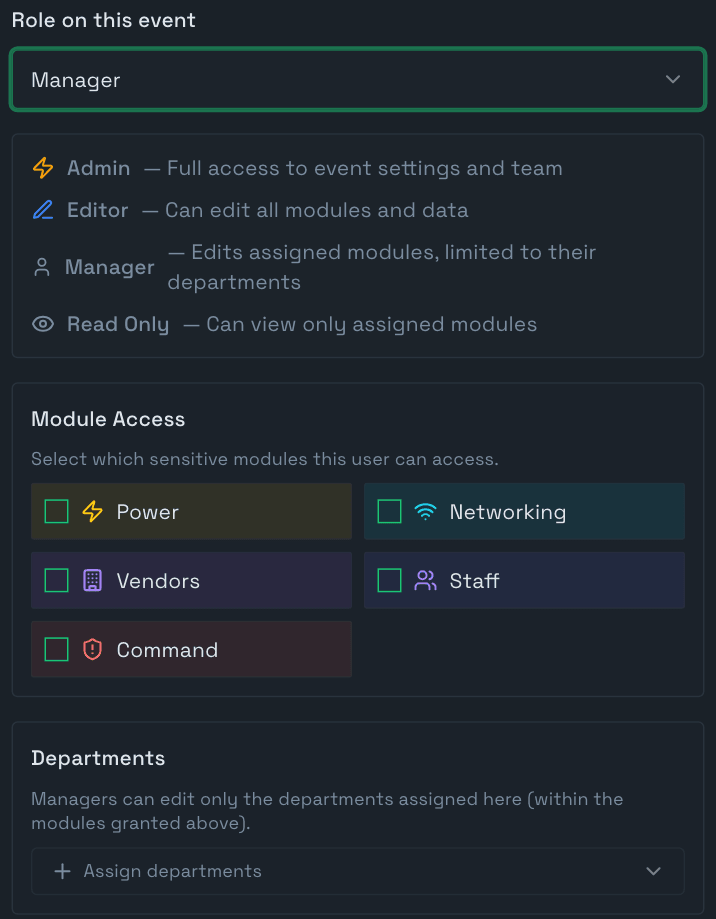
  • Roles per organization and event, scoped down to modules and departments. Two-factor sign-in with recovery codes, available on every account.
  • A full backup before every production database change, kept for 90 days.

What we're working towards

  • SOC 2 Type II In progress
  • External penetration testing Planned
  • ISO 27001 On the roadmap
Inviting a member to an event in MasterGrid: the role on this event set to Manager, with what Admin, Editor, Manager and Read Only can each do; Module Access for the sensitive modules Power, Networking, Vendors, Staff and Command; and a Departments picker, since managers can edit only the departments assigned to them.

Questions operators ask

What is MasterGrid?

MasterGrid is the spatial operating system for major events — the system of record for how a site gets built and run. You georeference your CAD site plan, and every structure becomes a live record with power, vendors, schedule, crews, incidents and carbon on one shared map and database, from load-in through load-out.

How is MasterGrid different from site-planning tools like OnePlan, Iventis, or FestivalPro?

Most event software helps you draw a site plan or manage admin workflows. MasterGrid runs the event itself: the georeferenced map is a live database that carries power distribution and measured load, NIMS/ICS-aligned incident command, equipment custody, staff deployment, and fuel and carbon figures with their basis stated. Planning tools stop at the drawing; MasterGrid keeps operating after gates open.

How does the carbon reporting work?

Power is planned against real generator, battery and grid specs and measured on site from clamp readings, with plan beside measured on every unit page. The Fuel & Carbon report states the basis of every figure — measured on site, event plan, or per charge — with grid factors for 50 US states and around 35 countries. Reporting comes out of normal operations instead of a post-event reconstruction.

Is MasterGrid aligned with NIMS/ICS for incident management?

Yes. Command runs operational tracks for Security/Command, Medical, Guest Services and Operations, alert levels from Green to Black, MCI levels with patient counts and transport, witness statements and evidence per incident, an activity trail that locks on resolve, and incident reports with response and resolution times against targets.

What size events is MasterGrid built for?

Temporary cities like a Grand Prix and permanent ones like stadiums, campuses and resorts — from a single-stage festival to a multi-venue production. The engine is the same; the defaults stay lean so a small event is not forced to operate like a Grand Prix.

How do I get access, and what does it cost?

Request a demo. We walk you through the platform on your own site plan and set up the license that fits: an Event License covers one event edition from advance through closeout, and permanent venues and multi-event operators talk to us about a Venue & Enterprise agreement.

How does MasterGrid protect our data?

Data is isolated per event and per organization, with row-level security on every table. Tests for those policies run on every change before it ships. Site plans, documents and evidence live in private storage and open through short-lived signed links. Traffic is encrypted in transit with TLS, and our hosting providers encrypt data at rest. Access is role-based and scoped to an organization and an event, and two-factor sign-in with recovery codes is available on every account. A full backup is taken before every production database change and kept for 90 days. SOC 2 Type II is in progress, external penetration testing is planned, and ISO 27001 is on the roadmap. A Data Processing Addendum is available on request.

Read the trust center

Join the waitlist

We walk you through the platform on your own site plan and set up the license that fits — an Event License for one event, or a Venue & Enterprise agreement for permanent sites and multi-event operators.

No spam, no list-selling.