Advance & Admin
Advance the whole show from one record.
For production managers and advance teams.
Send a form, approve the answers, and the people, rooms, trucks and credentials become records instead of email threads. Nothing on the event changes until you approve it.
Advance & Admin
Built for Producers.
One record for the whole advance. The forms go out from it, the answers come back into it, and everyone reads from it.
- Send the advance, not a spreadsheet. Forms pre-filled with what you hold, sent as a private link, no login.
- Approve once and it is done. Answers become the space, the gear, the person or the vendor, field by field.
- Rooms, flights and meals from one roster. Lodging holds, travel legs with live flight tracking, catering by day and meal.
- Nothing changes behind your back. A change log with restore, locked fields, access scoped by role and department.
Advance Forms Advance & intake
Ask once, approve once, and the record is made.
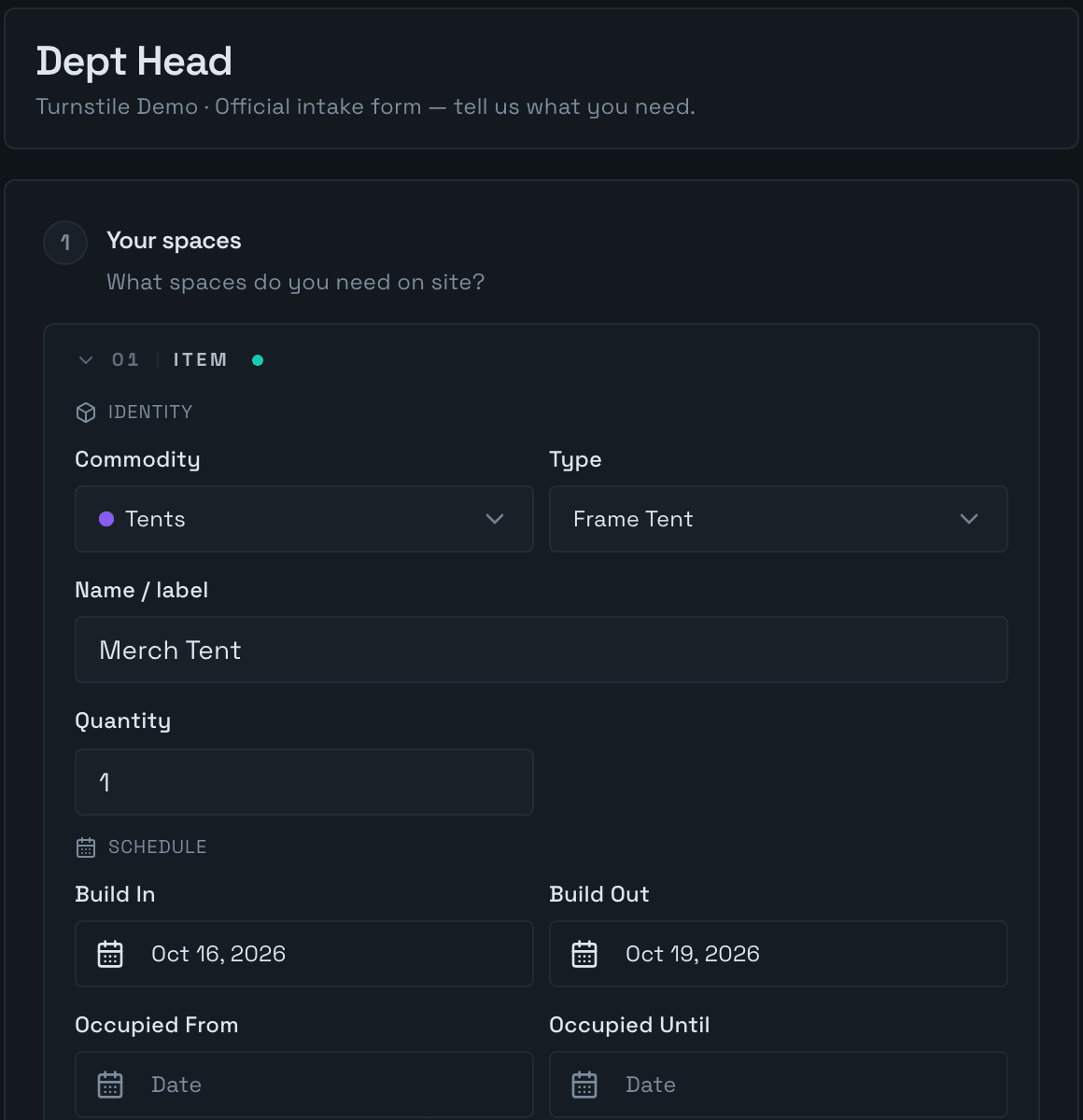
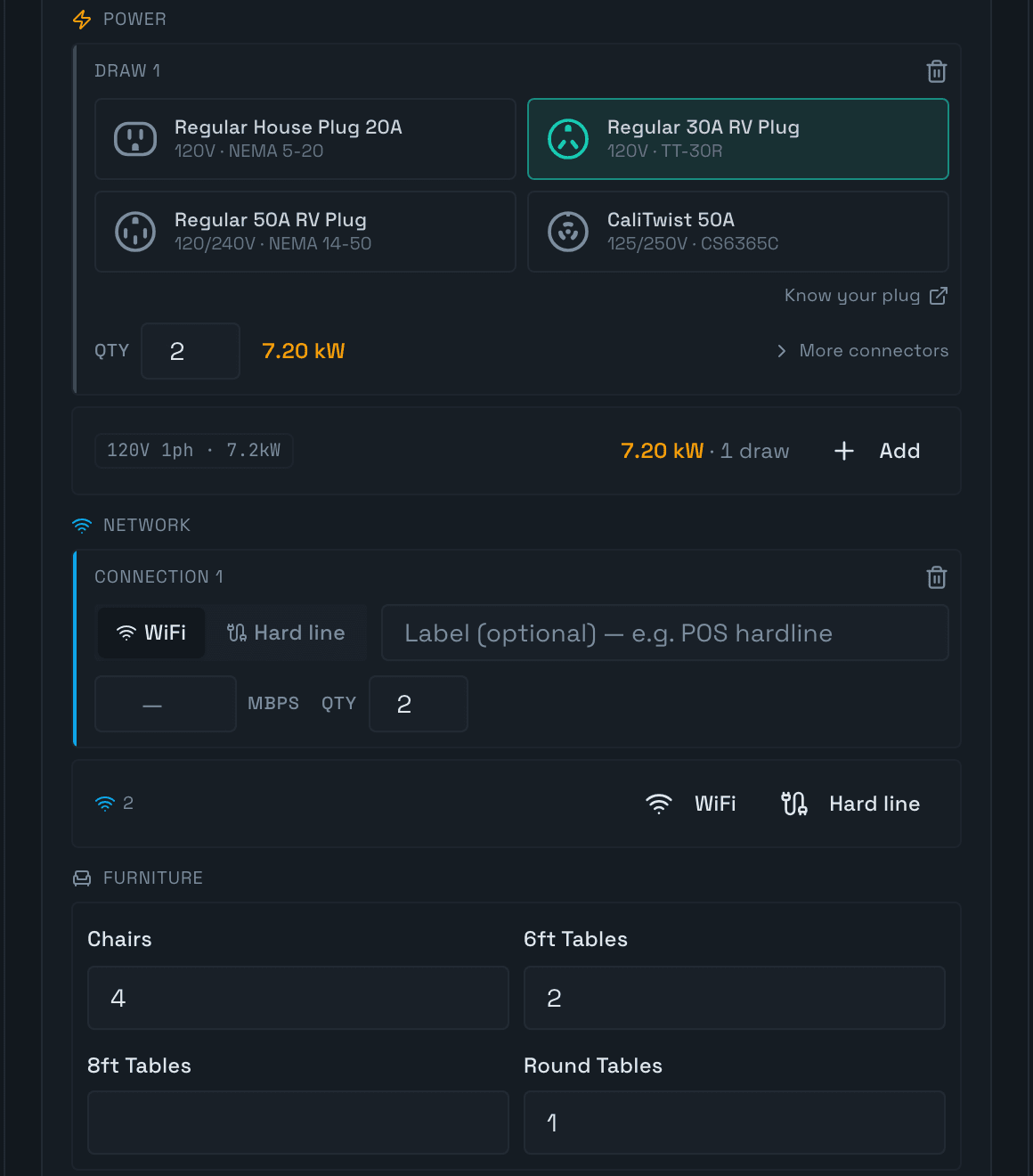
- Six standard forms for Spaces, Quartermaster, Signage, Staff, Vendors and Production, plus a custom builder. Each person gets their own private link and needs no login.
- Forms open pre-filled with what you already hold and ask only what applies. Respondents save as they go, upload files and submit.
- Answers wait in Approvals. Approve, approve with changes, deny with a reason or send it back, field by field. Nothing on the event changes until you approve.
Production Artists & advance
From rider to gate, one advance.
- Each act as one record: advance contacts, touring party, riders and stage plots.
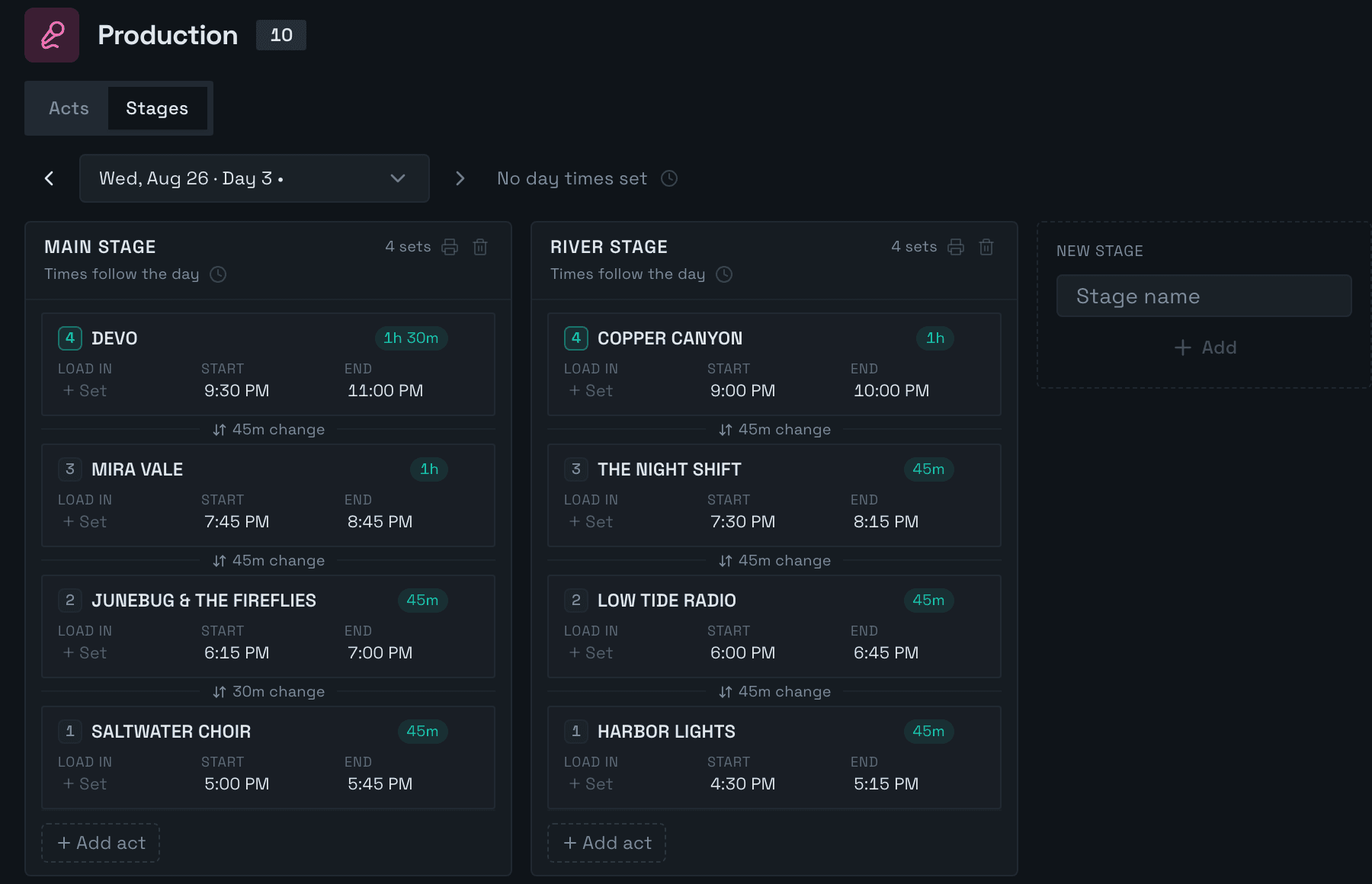
- Stage schedules programmed privately, then published to the day. Move a set and the changeovers move with it; pin a set to hold it.
- The act fills in its advance with no login. Approving it delivers people, trucks, buses and rooms ready to book, and each camp gets its own share sheet showing nothing about other acts.
Staff Team management
The roster, the beds, the flights, the meals.
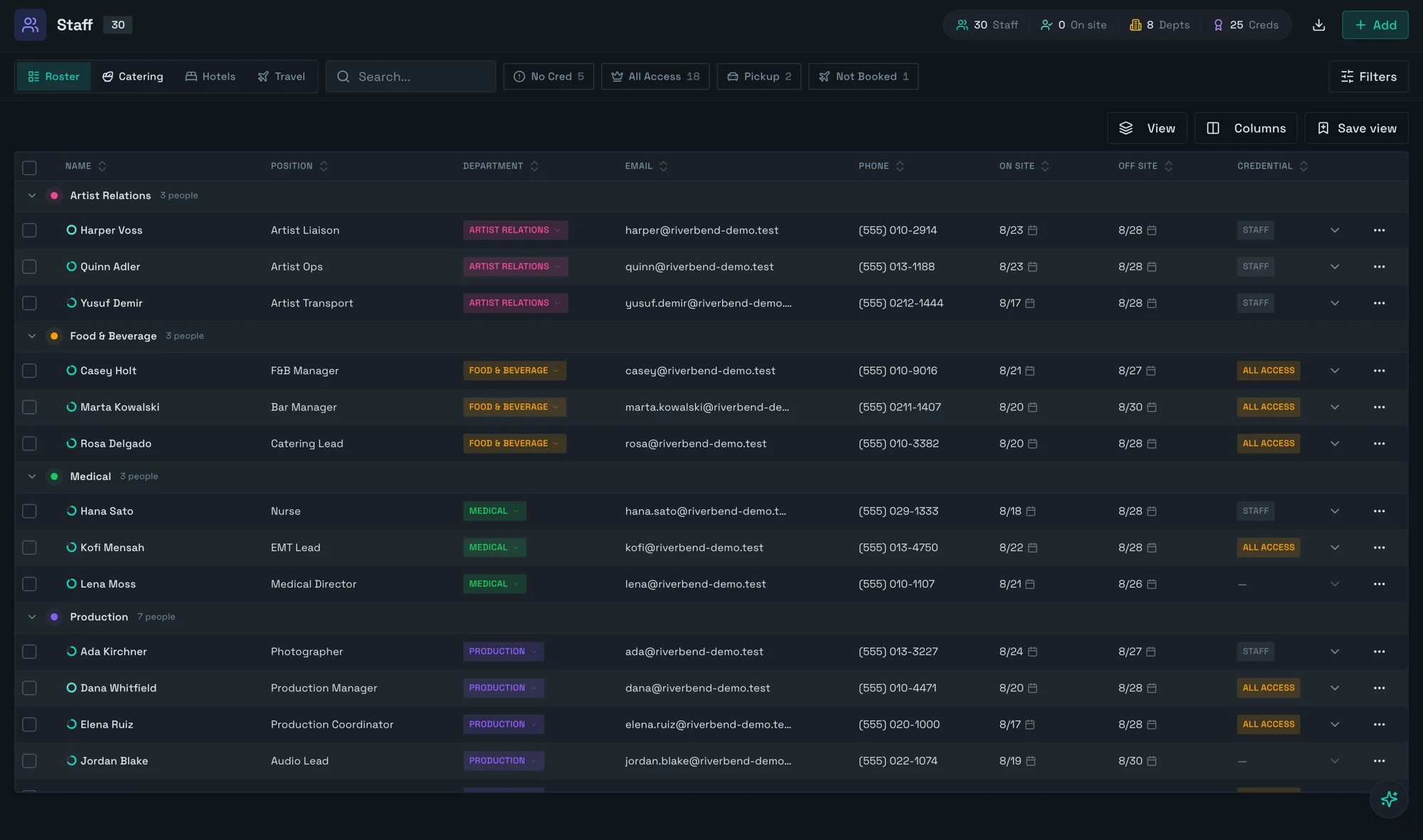
Lena Moss
Medical Director Medical Contractor
- Position: done
- Department: done
- Contact: done
- On-site dates: done
- Credential: still to do
- Shirt: done
- Agreement: done
- Lodging: done
- Travel: done
Next: pick a credential
- Agreement
- Signed
- Credential
- None picked yet
- Lodging
- Harborline Hotel · River SuiteAug 21 to Aug 26
- Travel
- AA 918 from CLT, lands Sat Aug 22, 10:25 AMBooked · airport pickup · home on AA 1440 on Aug 26
- Catering
- Gluten-FreeNo Nuts
- On site
- Aug 21 to Aug 26 · shirt M
Dana Whitfield
Production Manager Production Employee
- Position: done
- Department: done
- Contact: done
- On-site dates: done
- Credential: done
- Shirt: done
- Agreement: done
- Lodging: done
- Travel: done
Every step done. Nothing left to chase.
- Agreement
- Signed
- Credential
- AA All Access
- Lodging
- Harborline Hotel · Single KingAug 20 to Aug 28
- Travel
- DL 1015 from MSP, lands Fri Aug 21, 11:40 AMBooked · home on DL 2210 on Aug 28
- Catering
- No dietary needs
- On site
- Aug 20 to Aug 28 · shirt M
Quinn Adler
Artist Ops Artist Relations Employee
- Position: done
- Department: done
- Contact: done
- On-site dates: done
- Credential: done
- Shirt: done
- Agreement: still to do
- Lodging: done
- Travel: done
Next: mark the agreement signed
- Agreement
- Not signed yet
- Credential
- STAFF Staff
- Lodging
- Harborline Hotel · Double QueenAug 23 to Aug 28, shared with Harper Voss
- Travel
- WN 771 from BNA, lands Sun Aug 23, 11:35 AMBooked · home on WN 902 on Aug 28
- Catering
- No dietary needs
- On site
- Aug 23 to Aug 28 · shirt S
Ada Kirchner
Photographer Production Contractor
- Position: done
- Department: done
- Contact: done
- On-site dates: done
- Credential: done
- Shirt: done
- Agreement: still to do
- Lodging: still to do
- Travel: still to do
Next: mark the agreement signed
- Agreement
- Not signed yet
- Credential
- STAFF Staff
- Lodging
- Not set yet
- Travel
- Not added yet
- Catering
- No dietary needs
- On site
- Aug 24 to Aug 27 · shirt XL
- Roster Saved column layouts, inline and bulk edit, and a spreadsheet import that previews every row before writing.
- Lodging Hotels, room holds, check-in and check-out.
- Travel Inbound and outbound legs, arrivals grouped by day for pickups, and live flight tracking from a pasted flight number.
- Catering A board by day and meal with dietary needs and totals. Vendor crews are counted in without fake staff records.
Catering
Breakfast 27Lunch 27Dinner 27 81 meals · $1,499 Vegetarian 1
Breakfast 30Lunch 30Dinner 30 90 meals · $1,665 Vegan 1Vegetarian 1Gluten-Free 1No Nuts 1
Breakfast 32Lunch 38Dinner 68 138 meals · $2,553 Vegan 1Vegetarian 1Gluten-Free 1No Nuts 1
Breakfast 34Lunch 39Dinner 62 135 meals · $2,498 Vegan 1Vegetarian 1Gluten-Free 1No Nuts 1
Breakfast 34Lunch 39Dinner 63 136 meals · $2,516 Vegan 1Vegetarian 1Gluten-Free 1No Nuts 1
| Person | Thu 20 | Fri 21 | Sat 22 | Sun 23 | Mon 24 | ||||||||||
|---|---|---|---|---|---|---|---|---|---|---|---|---|---|---|---|
| BBreakfast | LLunch | DDinner | BBreakfast | LLunch | DDinner | BBreakfast | LLunch | DDinner | BBreakfast | LLunch | DDinner | BBreakfast | LLunch | DDinner | |
| 6 | 6 | 6 | 6 | 6 | 6 | 6 | 6 | 6 | 6 | 6 | 5 | 6 | 6 | 6 | |
| Ada Kirchner Meals not provided | – | – | – | – | – | – | – | – | – | – | – | – | – | – | – |
| Dana Whitfield | 1 | 1 | 1 | 1 | 1 | 1 | 1 | 1 | 1 | 1 | 1 | 0 | 1 | 1 | 1 |
| Elena Ruiz | 1 | 1 | 1 | 1 | 1 | 1 | 1 | 1 | 1 | 1 | 1 | 1 | 1 | 1 | 1 |
| Jordan Blake | 1 | 1 | 1 | 1 | 1 | 1 | 1 | 1 | 1 | 1 | 1 | 1 | 1 | 1 | 1 |
| Maya Lindqvist | 1 | 1 | 1 | 1 | 1 | 1 | 1 | 1 | 1 | 1 | 1 | 1 | 1 | 1 | 1 |
| Miles Archer | 1 | 1 | 1 | 1 | 1 | 1 | 1 | 1 | 1 | 1 | 1 | 1 | 1 | 1 | 1 |
| Sam Okoye | 1 | 1 | 1 | 1 | 1 | 1 | 1 | 1 | 1 | 1 | 1 | 1 | 1 | 1 | 1 |
| 4 | 4 | 4 | 5 | 5 | 5 | 6 | 6 | 6 | 6 | 6 | 6 | 6 | 6 | 6 | |
| Beck Solano | · | · | · | · | · | · | 1 | 1 | 1 | 1 | 1 | 1 | 1 | 1 | 1 |
| Carlos Mendes | 1 | 1 | 1 | 1 | 1 | 1 | 1 | 1 | 1 | 1 | 1 | 1 | 1 | 1 | 1 |
| June Okafor | 1 | 1 | 1 | 1 | 1 | 1 | 1 | 1 | 1 | 1 | 1 | 1 | 1 | 1 | 1 |
| Owen Park | 1 | 1 | 1 | 1 | 1 | 1 | 1 | 1 | 1 | 1 | 1 | 1 | 1 | 1 | 1 |
| Priya Nair | · | · | · | 1 | 1 | 1 | 1 | 1 | 1 | 1 | 1 | 1 | 1 | 1 | 1 |
| Ruth Abara | 1 | 1 | 1 | 1 | 1 | 1 | 1 | 1 | 1 | 1 | 1 | 1 | 1 | 1 | 1 |
| 2 | 2 | 2 | 3 | 3 | 3 | 3 | 4 | 4 | 3 | 3 | 3 | 3 | 3 | 3 | |
| Casey Holt Vegan | · | · | · | 1 | 1 | 1 | 1 | 1 | 1 | 1 | 1 | 1 | 1 | 1 | 1 |
| Marta Kowalski | 1 | 1 | 1 | 1 | 1 | 1 | 1 | 1 | 1 | 1 | 1 | 1 | 1 | 1 | 1 |
| Rosa Delgado Vegetarian | 1 | 1 | 1 | 1 | 1 | 1 | 1 | 2 | 2 | 1 | 1 | 1 | 1 | 1 | 1 |
| 3 | 3 | 3 | 3 | 3 | 3 | 3 | 3 | 3 | 3 | 3 | 3 | 3 | 3 | 3 | |
| Devon Marsh | 1 | 1 | 1 | 1 | 1 | 1 | 1 | 1 | 1 | 1 | 1 | 1 | 1 | 1 | 1 |
| Grant Foss | 1 | 1 | 1 | 1 | 1 | 1 | 1 | 1 | 1 | 1 | 1 | 1 | 1 | 1 | 1 |
| Simone Laurent | 1 | 1 | 1 | 1 | 1 | 1 | 1 | 1 | 1 | 1 | 1 | 1 | 1 | 1 | 1 |
| Tal Brody Meals not provided | – | – | – | – | – | – | – | – | – | – | – | – | – | – | – |
| 1 | 1 | 1 | 2 | 2 | 2 | 3 | 3 | 3 | 3 | 3 | 3 | 3 | 3 | 3 | |
| Hana Sato | 1 | 1 | 1 | 1 | 1 | 1 | 1 | 1 | 1 | 1 | 1 | 1 | 1 | 1 | 1 |
| Kofi Mensah | · | · | · | · | · | · | 1 | 1 | 1 | 1 | 1 | 1 | 1 | 1 | 1 |
| Lena Moss Gluten-FreeNo Nuts | · | · | · | 1 | 1 | 1 | 1 | 1 | 1 | 1 | 1 | 1 | 1 | 1 | 1 |
| 3 | 3 | 3 | 3 | 3 | 3 | 3 | 3 | 3 | 3 | 3 | 3 | 3 | 3 | 3 | |
| Iris Chen | 1 | 1 | 1 | 1 | 1 | 1 | 1 | 1 | 1 | 1 | 1 | 1 | 1 | 1 | 1 |
| Leo Fontaine | 1 | 1 | 1 | 1 | 1 | 1 | 1 | 1 | 1 | 1 | 1 | 1 | 1 | 1 | 1 |
| Nolan Reyes | 1 | 1 | 1 | 1 | 1 | 1 | 1 | 1 | 1 | 1 | 1 | 1 | 1 | 1 | 1 |
| 1 | 1 | 1 | 1 | 1 | 1 | 1 | 1 | 1 | 3 | 3 | 3 | 3 | 3 | 3 | |
| Harper Voss | · | · | · | · | · | · | · | · | · | 1 | 1 | 1 | 1 | 1 | 1 |
| Quinn Adler | · | · | · | · | · | · | · | · | · | 1 | 1 | 1 | 1 | 1 | 1 |
| Yusuf Demir | 1 | 1 | 1 | 1 | 1 | 1 | 1 | 1 | 1 | 1 | 1 | 1 | 1 | 1 | 1 |
| 1 | 1 | 1 | 1 | 1 | 1 | 1 | 1 | 1 | 1 | 1 | 1 | 1 | 1 | 1 | |
| Bea Whitlock | 1 | 1 | 1 | 1 | 1 | 1 | 1 | 1 | 1 | 1 | 1 | 1 | 1 | 1 | 1 |
| Vendors crews counted in from the vendor roster, no staff records | |||||||||||||||
| Cascade Power Co | 6 | 6 | 6 | 6 | 6 | 6 | 6 | 6 | 6 | 6 | 6 | 6 | 6 | 6 | 6 |
| Ironline Security Group | · | · | · | · | · | · | · | · | 24 | · | · | 24 | · | · | 24 |
| Riverbend Rentals | · | · | · | · | · | · | · | 5 | 5 | · | 5 | 5 | · | 5 | 5 |
| Other meal counts for people you do not track by name | |||||||||||||||
| Overnight security | · | · | · | · | · | · | · | · | 6 | · | · | · | · | · | · |
| Total meals | 27 | 27 | 27 | 30 | 30 | 30 | 32 | 38 | 68 | 34 | 39 | 62 | 34 | 39 | 63 |
Hover a cell to read it. A muted 1 is the board's assumption: everyone on site eats unless told otherwise.
Credentials Types, zones & holders
Credential types, the zones they open, and who holds what.
- Credential types Credential types by category, from staff and artist to media, VIP, contractor and guest, each with a short code, a colour and a physical format: laminate, wristband, hard card or RFID.
- Access matrix Access zones, and a matrix of which type opens which zone, so the gate reads the same rules the office set.
- Assignments Assign by person or by department in one batch. Each assignment tracks assigned, printed, issued or void, with a serial where you need one.
Access matrix
4 credential types 5 zones
| Credential type | |||||
|---|---|---|---|---|---|
| AA All Access | |||||
| VIP VIP | |||||
| STAFF Staff | |||||
| ARTIST Artist |
All Access opens all 5 zones: Backstage, Stage, Production Compound, Front of House and Parking.
Vendors Partner management
Where every vendor is in the build.
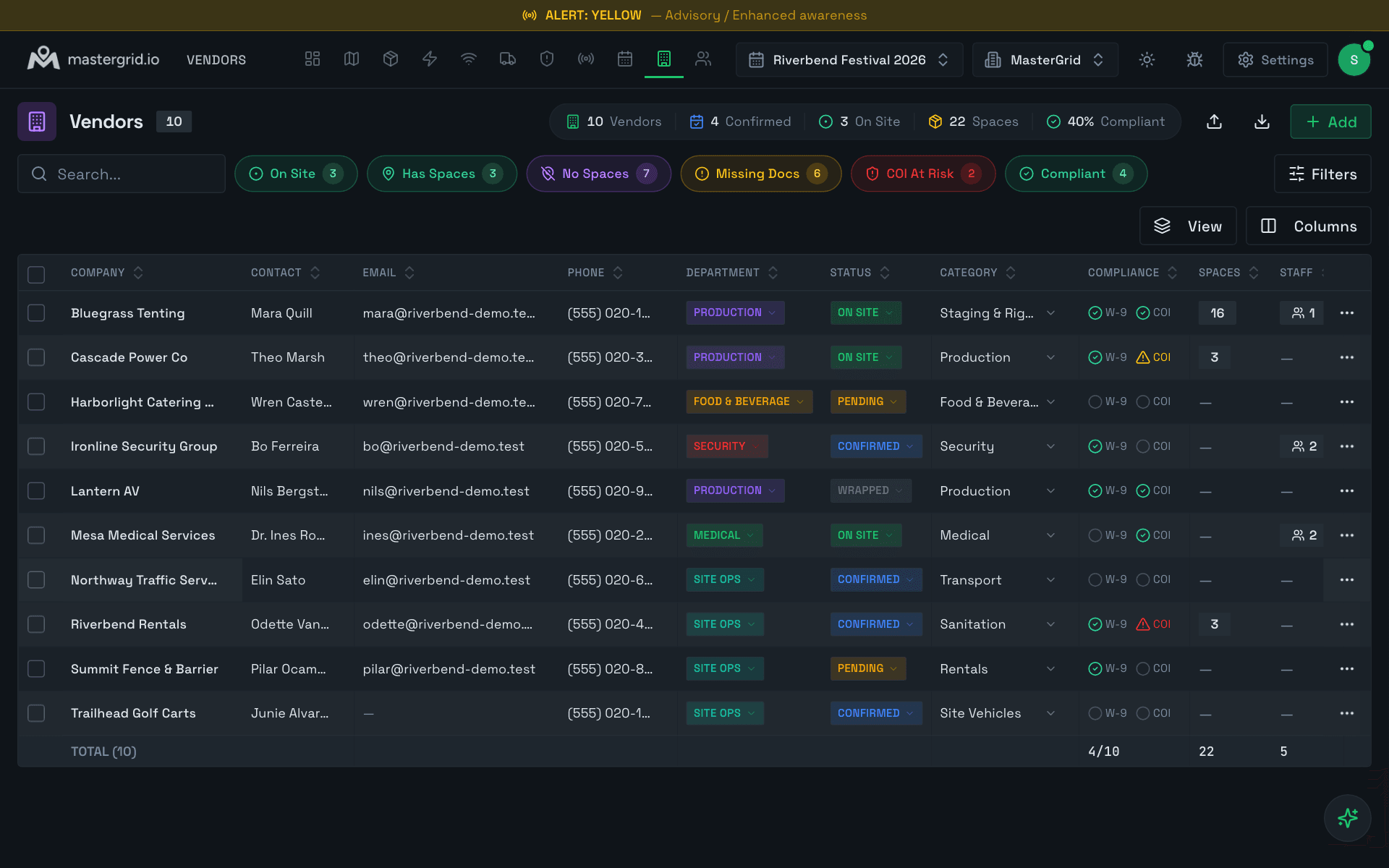
- Where each vendor is in the build, what they do, head count, arrival and departure, legal and billing details, on-site contact.
- Certificates of insurance warn before they lapse and turn red when they do. One chip narrows the roster to the vendors at risk.
- Send a vendor a form pre-filled with what you hold; nothing changes until you approve it line by line. Vendor crews are counted into catering and rooms.
Import CAD & spreadsheets
Bring in the files you already have.
- CAD site plans as DWG, DXF or PDF up to 150 MB, aligned to the satellite with three control points. A drone scan as a GeoTIFF positions itself.
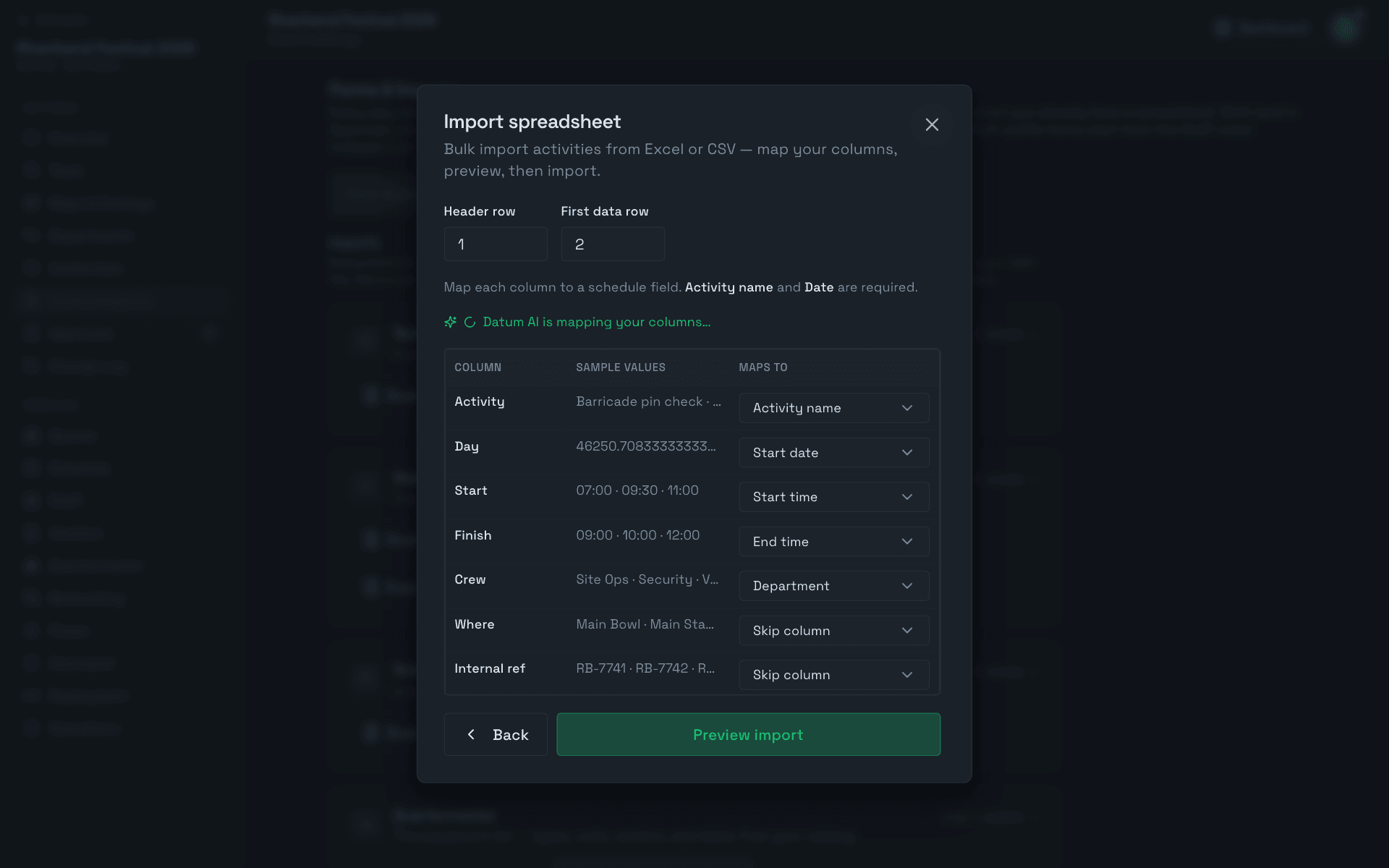
- Spreadsheet workbooks for Spaces, Staff, Schedule, Quartermaster, Deployment and Signage. Download a template built from your event's own values, or upload your own file in any column order.
- The AI column mapper proposes the mapping from your headers and sample values, you correct it, and a preview counts what will happen before anything is written. Most importers match on re-import instead of duplicating.
FAQ
Questions operators ask
Do vendors, crews and artists need an account to fill in a form?
What happens when I approve a submission?
Can I import the roster and vendor list we already have?
Who can see the advance data?
Join the waitlist
We walk you through the platform on your own site plan and set up the license that fits — an Event License for one event, or a Venue & Enterprise agreement for permanent sites and multi-event operators.